
ShopLinx Logo
Home
Features
Case Studies
Pricing
Blogs
Contact
LoginFree Forever
ShopLinx Logo

Transform your business with our cutting-edge AI solutions. Experience seamless customer interactions, efficient inventory management, and data-driven insights that drive growth and success.

Quick Links

  • Home
  • Features
  • Case Studies
  • Pricing

Company

  • About Us
  • Blogs
  • Videos
  • Terms & Conditions
  • Privacy Policy

Contact Us

  • Time Square, Maneksha Nagar, Dwarka, Nashik, Maharashtra 422011
  • hello@shoplinx.ai
  • +91 93071 97804
Accepted Payment Methods:
StripeVisaMastercardUpiPayPal

© Copyright 2025, All Rights Reserved by Shoplinx.

Free Forever
How to Sell on Instagram and WhatsApp Without a Website in 2026: The Ultimate Guide
All Blogs
Social Commerce, eCommerce Guides, Instagram Selling 14 min read

How to Sell on Instagram and WhatsApp Without a Website in 2026: The Ultimate Guide

H

Hitesh K

|
January 5, 2026
|
14 min
Share
H

Hitesh K

|
January 5, 2026
|
14 min read
Share
Table of Contents
1Why Building a Traditional Website Can Kill Your Small Business1. The Hidden Costs of "Starting Up"2. The "Ghost Town" Effect3. Friction in the Buying Process2The New Way: What is an Automated Product Catalogue?How Shoplinx's Catalogue Feature Works:3Step-by-Step Guide: Setting Up Your Store on ShoplinxStep 1: Create Your Organization and BrandStep 2: Upload Your InventoryStep 3: Customize Your Catalogue Website4Marketing Your Catalogue: Converting Comments into Sales1. The "Comment-to-DM" Automation Strategy2. WhatsApp Broadcasts for New Arrivals3. The "Link in Bio" Upgrade5Managing Orders: The Unified Inbox AdvantageOne Screen, All ConversationsTeam Collaboration (Role-Based Access)6Frequently Asked Questions (FAQ)Q1: Can I really sell on Instagram without a website?Q2: Is the Shoplinx Catalogue free to create?Q3: How do I accept payments on a Catalogue Website?Q4: Can I connect my own domain name later?7Conclusion
Table of Contents
7
1Why Building a Traditional Website Can Kill Your Small Business1. The Hidden Costs of "Starting Up"2. The "Ghost Town" Effect3. Friction in the Buying Process2The New Way: What is an Automated Product Catalogue?How Shoplinx's Catalogue Feature Works:3Step-by-Step Guide: Setting Up Your Store on ShoplinxStep 1: Create Your Organization and BrandStep 2: Upload Your InventoryStep 3: Customize Your Catalogue Website4Marketing Your Catalogue: Converting Comments into Sales1. The "Comment-to-DM" Automation Strategy2. WhatsApp Broadcasts for New Arrivals3. The "Link in Bio" Upgrade5Managing Orders: The Unified Inbox AdvantageOne Screen, All ConversationsTeam Collaboration (Role-Based Access)6Frequently Asked Questions (FAQ)Q1: Can I really sell on Instagram without a website?Q2: Is the Shoplinx Catalogue free to create?Q3: How do I accept payments on a Catalogue Website?Q4: Can I connect my own domain name later?7Conclusion

It is a common belief in the digital age: "If you want to start a business, you need a website."

For years, this has been standard advice. You buy a domain, pay for hosting, hire a developer, and spend weeks setting up a Shopify or WooCommerce store before you even make your first sale. But in 2026, the rules of e-commerce have changed.

The rise of Social Commerce growth—selling directly on platforms like Instagram, WhatsApp, and Facebook—has rendered the traditional, heavy website model optional for many small business owners. Today, your customers are not searching for you on Google; they are discovering you on Instagram Reels and chatting with you on WhatsApp.

So, why force them to leave their favorite apps to visit a slow-loading website?

In this guide, we will explore how you can build a profitable online business without writing a single line of code. We will show you how to use Shoplinx.ai to create an automated Product Catalogue, manage inventory, and close sales directly within your customers' DMs.

Whether you are a home baker, a boutique owner, or a drop shipper, this is your roadmap to selling smarter, not harder.


Why Building a Traditional Website Can Kill Your Small Business

Before we dive into the solution, we need to address the elephant in the room. Why shouldn't you just build a regular website?

If you are a massive brand like Myntra or Amazon, a custom website is essential. But for Small and Medium Businesses (SMBs) or solo entrepreneurs, a traditional website often becomes a liability rather than an asset. Here is why:

1. The Hidden Costs of "Starting Up"

Platforms like Shopify are fantastic, but they come with a price tag. You have:

  • Monthly subscriptions (starting around $29/month)
  • Transaction fees
  • Paid themes (often $150+)
  • Expensive plugins for basic features like reviews or pop-ups

For a business just starting out, these overheads eat into your profit margins before you've even sold your first product.

2. The "Ghost Town" Effect

Building a website is easy; getting traffic to it is the hard part. A new website has zero authority. You must spend thousands on SEO or Facebook Ads just to get people to visit your store.

On the other hand, platforms like Instagram and WhatsApp already have billions of active users. It is much easier to sell where the people already are.

3. Friction in the Buying Process

Imagine a customer seeing your beautiful dress on Instagram.

Old Way:

  • Click the link in bio
  • Wait for the site to load
  • Search for the dress
  • Add to cart
  • Create an account
  • Pay

(High chance of drop-off)

New Way:

  • Comment "Price"
  • Get an automated DM with a Catalogue Link
  • Chat on WhatsApp
  • Pay via UPI

(Instant conversion)

Check out our guide on the Best Affordable AI Chatbot to see how automation reduces this friction even further.

The New Way: What is an Automated Product Catalogue?

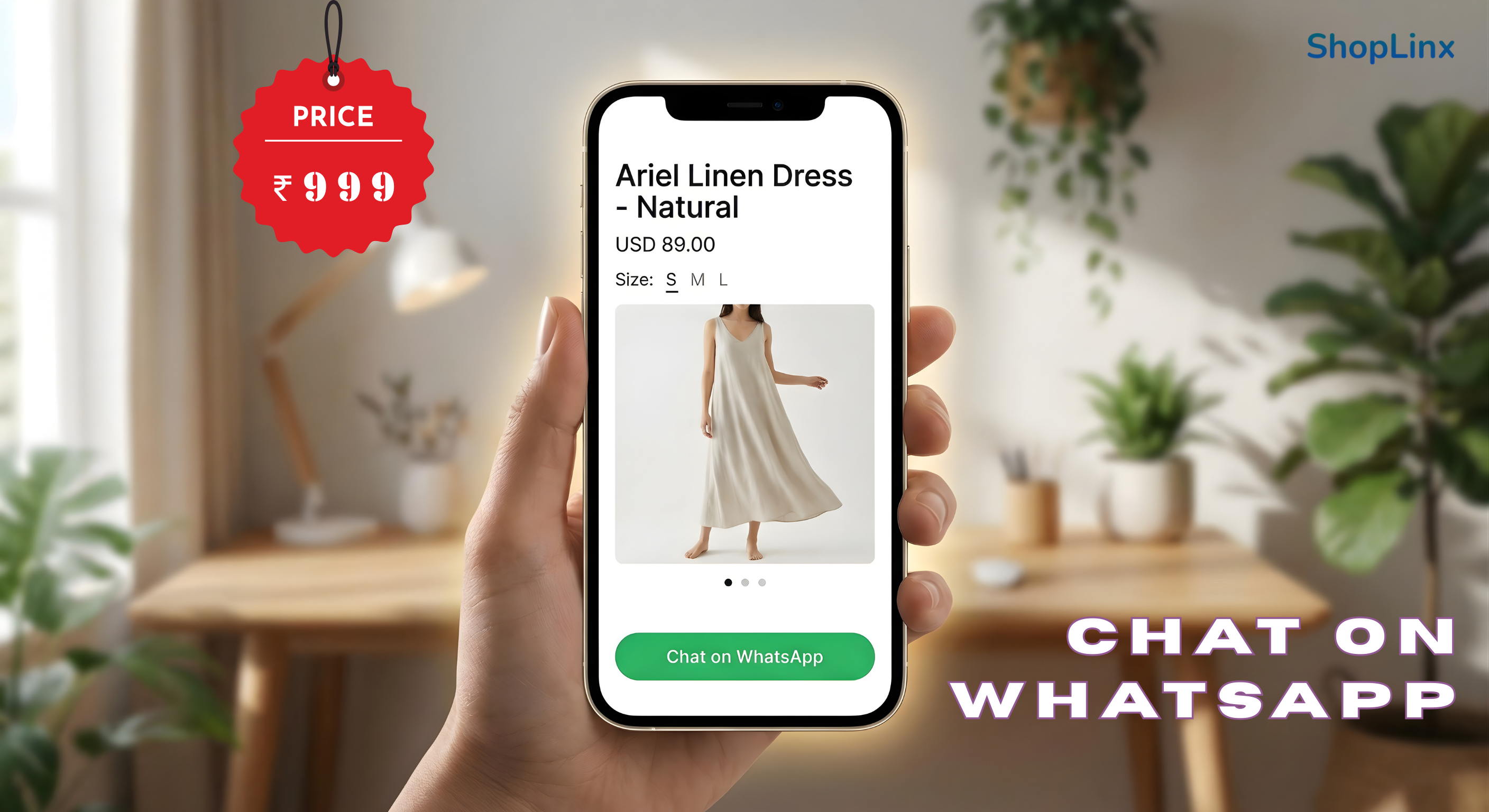
Mobile view of Shoplinx product catalogue with Buy on WhatsApp button

If you don't have a website, where do you showcase your products? Sending 50 photos to every customer on WhatsApp is spammy and unprofessional.

The solution is a "Headless" Catalogue Website.

A Catalogue Website gives you the best of both worlds. It looks and feels like a professional online store, but it is lightweight, auto-generated, and deeply integrated with chat apps.

How Shoplinx's Catalogue Feature Works:

Unlike traditional website builders where you drag and drop elements for hours, Shoplinx automates the process.

  1. Centralized Inventory: You add your products to the Shoplinx dashboard once.
  2. Auto-Generation: The system instantly creates a beautiful, mobile-optimized website for you.
  3. Real-Time Sync: If you change a price or go out of stock in your dashboard, the catalogue updates instantly.
  4. Chat-First Design: Every product page has a "Chat on WhatsApp" button instead of just "Add to Cart," encouraging conversation and trust.

According to our internal data, businesses using a Chat-Integrated Catalogue see a 30-40% higher conversion rate compared to traditional "Add to Cart" websites because customers love to ask questions before buying.

Learn more about managing high volumes of inquiries in our article: How to Handle 100+ Instagram DMs.


Step-by-Step Guide: Setting Up Your Store on Shoplinx

Ready to ditch the expensive website and start selling? Follow this step-by-step guide to launch your Shoplinx Catalogue Store in under 15 minutes.

Step 1: Create Your Organization and Brand

Shoplinx is built for scale. Its Organization-First Architecture allows you to manage multiple brands under one roof.

  • Sign up on Shoplinx.ai
  • Create your "Organization" (e.g., Rohit's Enterprises)
  • Add your specific "Business"

Step 2: Upload Your Inventory

This is where magic happens. You don't need to design pages; just focus on your products. Shoplinx dashboard showing easy product upload and inventory management
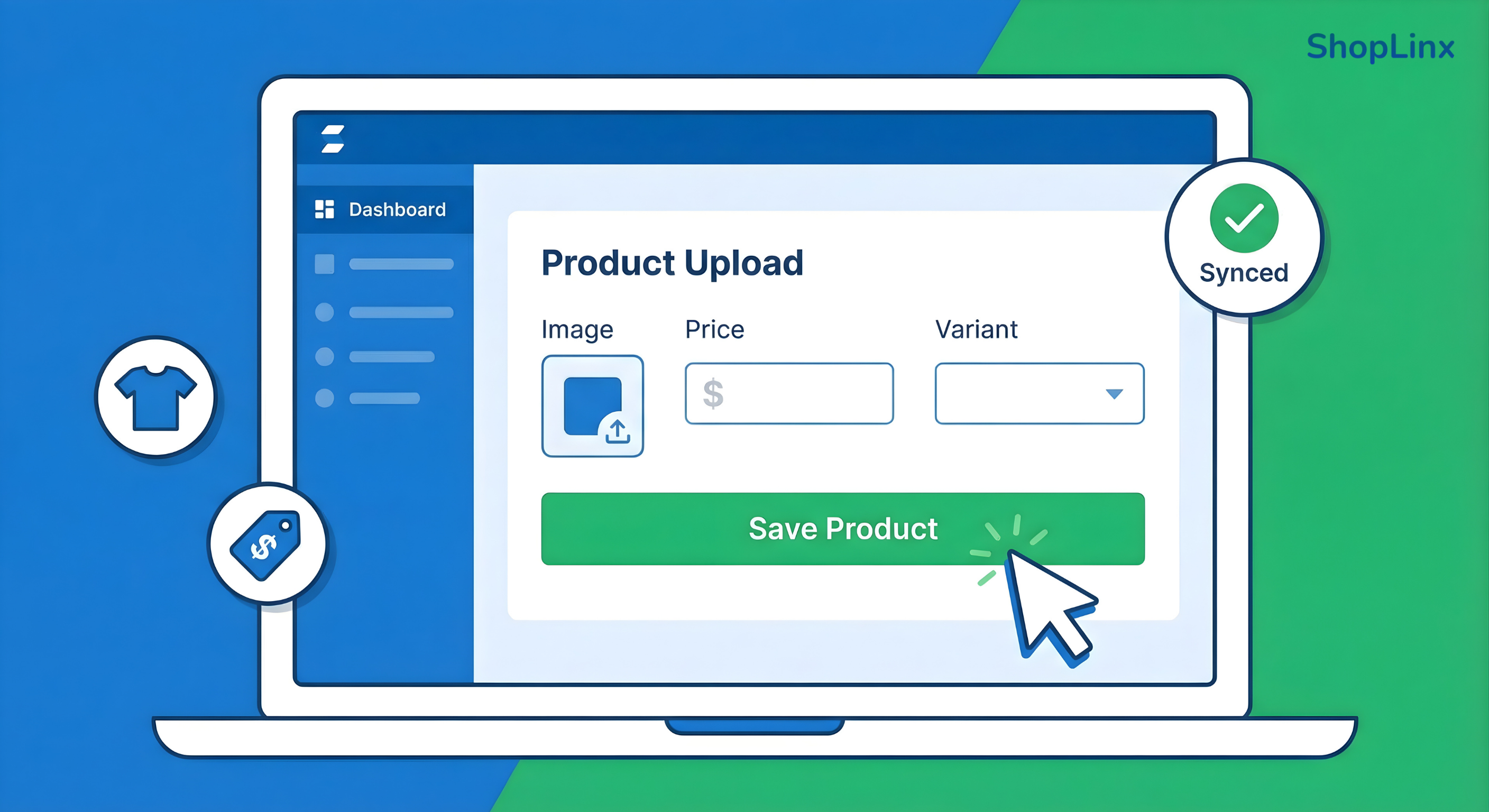
  • Navigate to the Inventory tab
  • Click "Add Product"
  • Details: Enter the Product Name, Description, and Base Price
  • Variants: Do you sell in sizes (S, M, L) or colors (Red, Blue)? Shoplinx allows you to add multiple variants easily
  • Images: Upload high-quality images. Remember, since customers can't touch the product, your images do the selling

Step 3: Customize Your Catalogue Website

Once your products are added:

  • Go to Settings > Catalogue Website
  • Domain Selection: Shoplinx provides a free sub-domain (e.g., sareeshop.shoplinx.ai), but you can also connect to your own Custom Domain (e.g., www.punesarees.com) for a premium look
  • Your store is now LIVE!

Now, when you share this link, customers see a professional store. But the real power lies in how you market this link using Automation.


Marketing Your Catalogue: Converting Comments into Sales

Now that your Shoplinx Catalogue is live, how do you get people to visit it?

In the traditional website model, you would spend money on Facebook Ads to drive traffic. But with Shoplinx, you can leverage Organic Social Automation to turn your existing Instagram engagement into direct sales.

Here are the three most powerful ways to market your "No-Code" store:

1. The "Comment-to-DM" Automation Strategy

This is the secret weapon of top D2C brands in 2026. Posting pictures of a product is easy. But replying to 500 people asking "Price?" or "PP" is impossible manually.

With Shoplinx's Automation Engine, you can set up a simple rule:
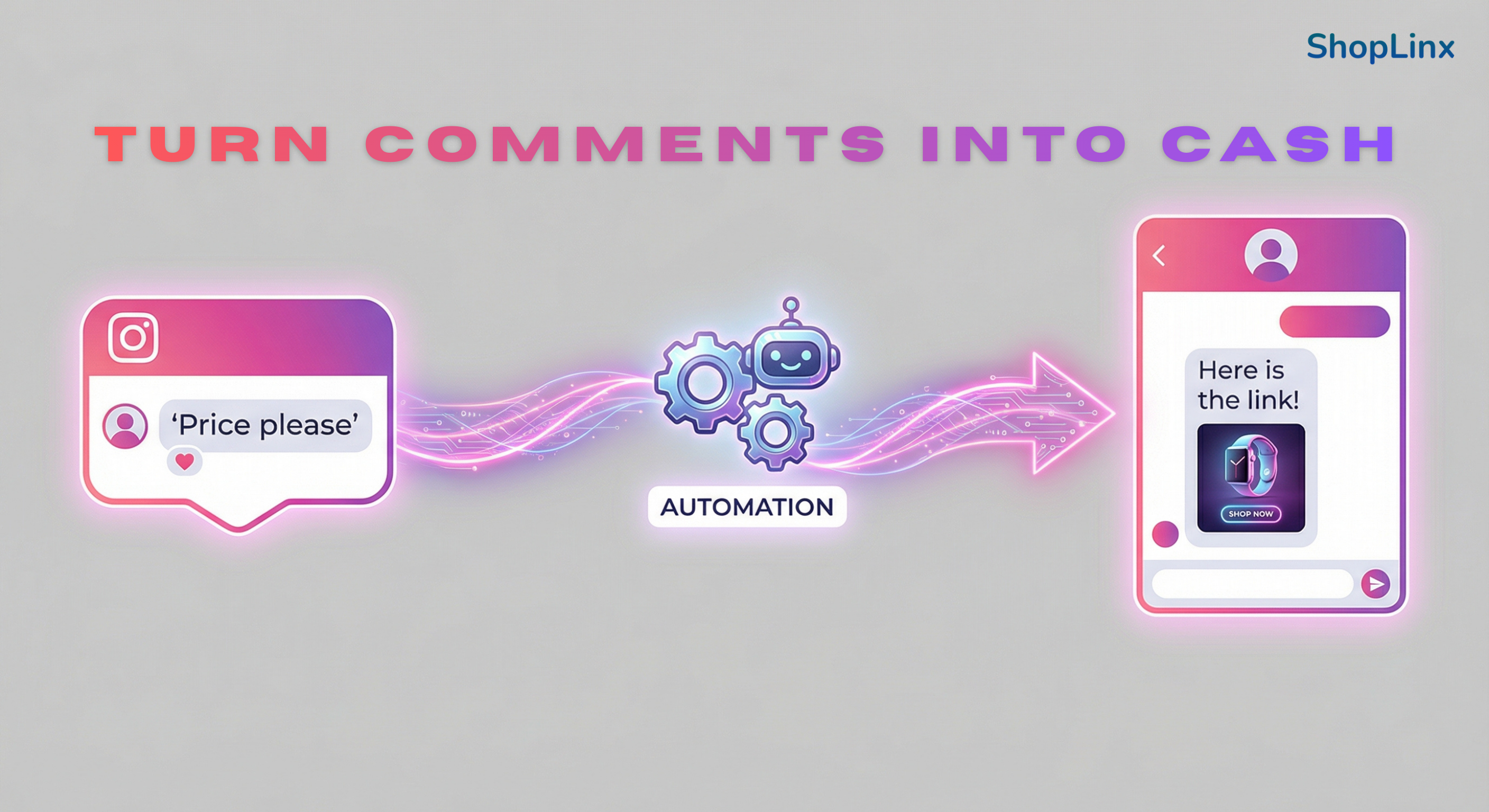
  • Trigger: When a user comments on "Price", "Buy", or specific keywords on your Instagram post
  • Action: The bot automatically replies to the comment (e.g., "Check your DM! 🛍️") AND sends a direct message with the specific Product Catalogue Link Diagram showing Instagram comment triggering an automated DM with product
link

This strategy does two things:

  1. Instant Gratification: The customer gets the link immediately while their interest is high
  2. Algorithm Boost: Instagram sees high engagement (comments + replies) and pushes your post to more people

For a deeper dive into tools that handle this, read our comparison of the Top 10 WhatsApp Automation Tools.

2. WhatsApp Broadcasts for New Arrivals

Email marketing has an open rate of 20%. WhatsApp has an open rate of 98%. Since your Shoplinx Catalogue is integrated with WhatsApp, you can collect customer phone numbers (with consent) and send them the catalogue link whenever you launch a new collection.

Instead of sending 50 images that clog their phone gallery, you send one professional link. The customer browses the catalogue, selects what they want, and replies directly in the chat.

3. The "Link in Bio" Upgrade

Instead of using generic link-tree tools, use your Shoplinx Catalogue link as your primary bio link. Since the catalogue is mobile-optimized, it acts as a mini-app for your brand, allowing customers to search and filter products effortlessly.


Managing Orders: The Unified Inbox Advantage

Selling without a website often leads to chaos. You have orders coming in from Instagram DMs, Facebook Messenger, and WhatsApp. Switching between three different apps means you are bound to miss messages and lose sales.

Shoplinx solves this with the Unified Omnichannel Inbox.

One Screen, All Conversations

The Unified Inbox pulls every message from Instagram, Facebook, and WhatsApp into a single dashboard.

  • If a customer asks a question on Instagram, you answer in Shoplinx
  • If they follow up on WhatsApp, you see that message in the same thread (if contacts are merged)
  • You can see exactly which product they are looking at from the catalogue context

Team Collaboration (Role-Based Access)

As your business grows, you can't handle everything alone. Shoplinx allows you to add team members and assign specific roles (Owner, Manager, Agent).

  • Assign Chats: You can route all "Sales" queries to one agent and "Support" queries to another
  • Zero Confusion: Once an agent takes a chat, it is "Locked" to them, ensuring two people don't reply to the same customer with different information

This level of organization is usually found in expensive Enterprise ERPs, but Shoplinx brings it to small businesses without the hefty price tag.

Automation isn't just about saving time; it's about revenue. Read How to Use a WhatsApp Chatbot to Increase Sales to learn advanced strategies.


Frequently Asked Questions (FAQ)

Here are the most common questions entrepreneurs ask about selling without a traditional website.

Q1: Can I really sell on Instagram without a website?

A: Absolutely. Thousands of businesses run entirely on Instagram and WhatsApp. By using a tool like Shoplinx, you can professionalize the process with a Product Catalogue, removing the need for a traditional coded website.

Q2: Is the Shoplinx Catalogue free to create?

A: Shoplinx offers various tiers. You can generate a product catalogue instantly as part of the platform's features. It saves you the cost of hosting, developers, and maintenance associated with platforms like WordPress or Shopify.

Q3: How do I accept payments on a Catalogue Website?

A: Since the Shoplinx catalogue is chat-integrated, the order flows into your WhatsApp or Unified Inbox. You can then collect payment via UPI (GPay, PhonePe) or send a payment link directly in the chat, verifying the transaction instantly.

Q4: Can I connect my own domain name later?

A: Yes! While Shoplinx provides a free sub-domain initially, you can connect to your own custom domain (e.g., www.mybrand.com) whenever you are ready to build a stronger brand identity.


Conclusion

In 2026, the barrier to entry for starting an online business is lower than ever. You do not need a fancy office, a big team, or an expensive website to build a successful brand.

All you need is:

  • A great product
  • A social media presence
  • The right tools to manage the backend

Shoplinx.ai bridges the gap between social media chaos and organized e-commerce. By combining a No-Code Product Catalogue, WhatsApp Automation, and a Unified Inbox, it empowers you to sell where your customers actually are.

Don't let the fear of "tech" stop you. Start your catalogue today and turn your followers into loyal customers.

👉 Start Your Free Trial with Shoplinx Today

Tags

Sell on InstagramWhatsApp CommerceNo Website StoreSocial CommerceFree Product CatalogueInstagram SellersShoplinx Guide